Air Cooler vs AIO Liquid Cooler — Which Should You Buy?
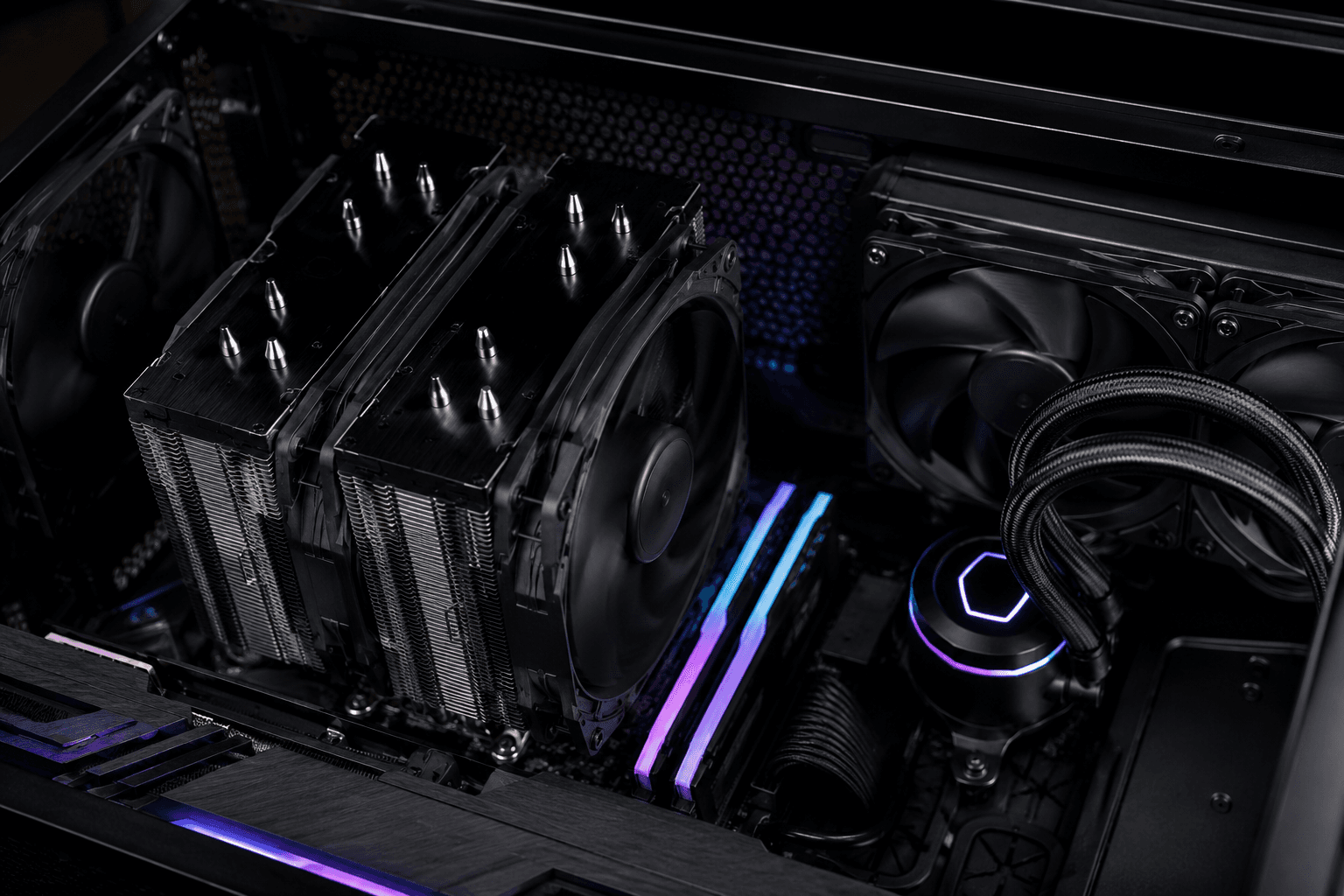
If you're trying to decide between an air cooler and an AIO liquid cooler, the short answer is this: a good air cooler will handle most gaming CPUs just as well as a mid-range AIO, and it does it with fewer parts that can fail. AIOs earn their keep on high-power chips, in cramped cases, or when you want a cleaner look inside the case. Neither option is universally "better" — it depends on the CPU, the case, and what you're actually trying to achieve.
That's not the answer most comparison articles give you, because air cooler vs AIO liquid cooler debates tend to get treated like a popularity contest rather than a practical decision. Having fitted both into dozens of builds, the choice usually comes down to three things: how much heat your CPU actually produces, how much airflow your case supports, and whether you're prepared to deal with the extra maintenance that comes with a pump and tubing.
How Air Coolers Actually Work
An air cooler is a block of fins connected to your CPU through a set of heat pipes, with one or two fans pushing air through those fins to carry heat away. There's no liquid, no pump, and nothing that can leak. It's about as close to "fit and forget" as PC cooling gets.
The performance ceiling on air cooling is higher than most people assume. A well-built dual-tower air cooler with two decent fans can match a 240mm AIO on many CPUs, and it'll often run quieter doing it because the fans aren't fighting against a thicker radiator and a separate pump whine. One mistake I see regularly is builders assuming air coolers are only for budget builds — plenty of enthusiast-grade air coolers exist that outperform entry-level AIOs by a meaningful margin.
Where air coolers fall short is physical clearance. A large dual-tower cooler can overhang your RAM slots or clash with tall heatsinks, and in smaller cases there may not be room for one at all. If you're working with a compact case, check the cooler height against the case's maximum clearance before you buy — this is one of the most common returns we see, and it's entirely avoidable with five minutes of checking.
How AIO Liquid Coolers Actually Work
An AIO (all-in-one liquid cooler) moves heat away from the CPU using a pump and a closed loop of coolant, which travels to a radiator where fans push the heat out of the case. Because the radiator is mounted separately from the CPU, often at the top or front of the case, AIOs free up space directly above the motherboard and tend to look tidier once everything's built.
The main advantage is heat capacity. On power-hungry CPUs running sustained loads, a 280mm or 360mm AIO will generally keep temperatures lower than even a strong air cooler, particularly under prolonged gaming sessions or content creation work. If you've picked a high core-count chip and you're planning to push it, this is where liquid cooling earns its price difference.
The trade-off is added complexity. You're now relying on a pump that can wear out, tubing that can theoretically degrade over years of use, and a radiator that needs unobstructed airflow to do its job. AIO pump failures aren't common, but when they happen they tend to happen with no warning — and unlike an air cooler, there's no fallback once the pump dies. We've replaced a small number of AIOs on repair jobs over the years, almost always after three to five years of use, which is worth bearing in mind if you're planning to keep the system long-term.
Cooling Performance: What Actually Matters
Most people fixate on temperature numbers in isolation, but the number that matters is temperature relative to your CPU's actual workload. A mid-range gaming CPU paired with a decent air cooler will comfortably stay within safe limits during gaming, because games rarely load every core to 100% for extended periods.
Where this changes is with higher-end chips, especially ones with high power draw under sustained all-core loads — video editing, 3D rendering, or compiling code, for example. Those workloads heat soak a cooler in a way gaming usually doesn't, and that's the scenario where a larger AIO genuinely outperforms air.
→ Light to moderate gaming loads: a good air cooler is usually sufficient
→ High-end CPUs under sustained full load: AIO has a real performance edge
→ Mixed gaming and creative work: depends on CPU power draw — check your specific chip's TDP
If you're still deciding between CPU platforms entirely, our breakdown on the Intel vs AMD for gaming comparison covers how power draw and thermal behaviour differ between the two, which feeds directly into this cooling decision.
Noise Levels: The Part Nobody Talks About Enough
Noise is where the air cooler vs AIO comparison gets genuinely interesting, because the marketing rarely matches the reality. A high-quality air cooler with two large, slow-spinning fans is often quieter under load than a budget AIO, because budget AIO pumps can produce an audible whine that air cooling simply doesn't have.
That said, premium AIOs with well-tuned pump curves and good radiator fans can be very quiet, sometimes quieter than a smaller air cooler working hard to cool a hot chip. The honest takeaway is that price and build quality matter more than the cooling method itself when it comes to noise. A £30 air cooler and a £30 AIO are both going to be noisier than you'd like; a £70 air cooler and a £140 AIO are both going to be close to silent.
Cost Comparison
Air coolers win comfortably on price at every tier. A capable air cooler that handles most gaming CPUs sits comfortably in the £25–£45 range, while a 240mm AIO that performs similarly typically starts around £70–£90, with 360mm units pushing past £120.
→ Budget air cooler (stock-level): £15–£25
→ Performance air cooler: £30–£50
→ 240mm AIO: £70–£100
→ 360mm AIO: £110–£160
If you're working to a tight budget, that price difference is usually better spent elsewhere in the build — a better GPU or an extra 8GB of RAM will do more for your gaming experience than the jump from air to liquid cooling. We covered this kind of budget prioritisation in our guide on how much a gaming PC costs, and cooling is one of the areas where overspending rarely pays off in actual performance.
Reliability and Long-Term Maintenance
This is the section most comparison articles skip, and it's arguably the most important one if you're keeping your system for five-plus years.
Air coolers have effectively one failure point: the fan bearing. Fans are cheap to replace, widely compatible, and give plenty of warning through increased noise before they fail outright. There's no fluid to leak, no pump to seize, and dust is the only real maintenance concern.
AIOs introduce more failure points. The pump can fail, though this is rare on quality units from reputable brands. Evaporation through the tubing over many years can very slowly reduce coolant volume, though this is a longer-term concern than a practical one for most builds. The bigger real-world issue is buying a budget AIO from a brand with poor quality control, where pump failures happen earlier and more often than they should.
✓ Buy AIOs from established cooling brands with a strong reliability track record
✓ Avoid the cheapest AIO option in any given size — this is where corners get cut
✓ Register your warranty immediately, since pump failures often happen outside the return window but within warranty
✓ Keep an eye on pump noise changes as an early warning sign of wear
Common Mistakes When Choosing Between Them
One mistake I see regularly is people buying a 360mm AIO for a CPU that barely needs a mid-range air cooler, purely because it looks more "premium." It doesn't hurt performance, but it's money that could have gone toward the GPU or storage instead.
The opposite mistake also happens — fitting a budget air cooler to a high-power CPU and then being confused when it throttles under sustained load. If you've chosen a power-hungry chip, match the cooling to it rather than assuming any cooler will do the job. Sustained high temperatures force the CPU to reduce its own clock speed to stay within safe limits, which quietly costs you performance without throwing up any obvious warning.
A third common mistake is ignoring case airflow entirely and assuming the cooler alone determines your temperatures. It doesn't. A great cooler in a poorly ventilated case will still run hot, and a modest cooler in a well-ventilated case can outperform expectations. If you haven't already, it's worth reading our piece on whether case airflow actually matters for gaming PC temps, since the two decisions are closely linked.
What We'd Choose
For the vast majority of gaming builds, we'd lean toward a quality air cooler. It's cheaper, simpler, quieter at the budget end, and has fewer ways to fail over a five-year lifespan. The performance gap to a similarly priced AIO is small enough on most gaming CPUs that it rarely justifies the extra cost and complexity.
Where we'd switch to an AIO: high-core-count CPUs under sustained heavy loads, builds where a large air cooler simply won't physically fit, or cases where the look of a clean loop genuinely matters to you. There's nothing wrong with choosing an AIO for aesthetics alone, as long as you go in understanding the trade-off rather than assuming it's automatically the superior choice.
If you'd rather not make this decision in isolation, our build configurator lets you spec a full system and see how cooling choices interact with your chosen CPU and case before you commit to anything.
Frequently Asked Questions
Is an AIO better than an air cooler for gaming?
Not necessarily. For most gaming CPUs, a quality air cooler performs within a few degrees of a similarly priced AIO. AIOs pull ahead mainly on high-power chips under sustained, non-gaming workloads.
Do AIO liquid coolers leak?
Leaks are rare on quality units from established brands, but they're not impossible. Budget AIOs from lesser-known manufacturers carry a higher risk, which is one reason brand reputation matters more here than in most other components.
How long do AIO coolers last?
Most quality AIOs last five to seven years before pump wear becomes a concern, though this varies by brand and usage. Air coolers generally outlast this, since fans are the only wearing part and are simple to replace.
Are air coolers loud?
Cheap air coolers with small, fast-spinning fans can be noisy under load. Larger, well-built air coolers with bigger fans running at lower RPM are often quieter than budget AIOs.
Can I fit a big air cooler in any case?
No — clearance varies significantly between cases. Always check the cooler's height rating against your case's maximum CPU cooler clearance before buying, especially in compact or small form factor builds.
Does cooling choice affect CPU lifespan?
Running consistently hot can shorten a CPU's effective lifespan and increase the likelihood of thermal throttling, but either a properly sized air cooler or AIO will keep modern CPUs within safe limits for normal gaming use.
Is it worth upgrading from air to AIO later?
Usually only if you've upgraded to a significantly more power-hungry CPU than your original cooler was rated for. If your current air cooler is keeping temperatures under control, switching to an AIO purely for the sake of it rarely delivers a noticeable real-world benefit.