LOADING...
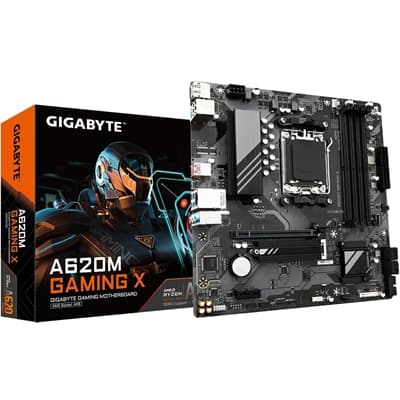
- Socket: AM5
- CPU Compatibility: AMD Ryzen 9000/8000/7000
- Chipset: AMD A620
- Form Factor: Micro ATX
- Memory Slots: DDR5 - 4 Slots
- M.2 Compatibility: PCIe 4 / PCIe 3
- Wi-Fi: No
With the fast-moving technology changes, GIGABYTE always follows the latest trends and provides customers with advanced features and latest technologies. GIGABYTE motherboards are equipped with upgraded power solution, latest storage standards and outstanding connectivity to enable optimized performance for gaming.
GIGABYTE A620 Motherboards are ready to work with the PCIe 4.0 devices which are expected to experience twice bandwidth than the current PCIe 3.0 devices. To reach the high speed and maintain good signal integrity, GIGABYTE R&D uses the low impedance PCB to provide the maximum performance.
GIGABYTE A620 Motherboards are ready to work with the PCIe 4.0 devices which are expected to experience twice bandwidth than the current PCIe 3.0 devices. To reach the high speed and maintain good signal integrity, GIGABYTE R&D uses the low impedance PCB to provide the maximum performance.
All memory routing is under the PCB inner layer shielded by a large ground layer to protect from external interference.
GIGABYTE AM5 MB supports both AMD EXPO? and Intel� XMP overclocking memory modules for maximal compatibility. MB will automatically detect both profiles format in SPD, users can choose to enable one of profiles from BIOS menu and easily reach overclocked memory performance.
Automatically Boost the Native DDR5 frequency to 5000MHz while the system is under heavy loading by a single click.
Define and create your own SPD profile into Native, AMD EXPO? and Intel� XMP 3.0 memory modules. One user-defined profile can be saved, loaded either locally or from/to an external storage device.
- One empty SPD profile can be defined by users and carry to next computer
- Quick memory performance simulation based on user input clock and timing parameters
- Profile save and load function to share your memory parameters online
- One empty SPD profile can be defined by users and carry to next computer
- Quick memory performance simulation based on user input clock and timing parameters
- Profile save and load function to share your memory parameters online
GIGABYTE MOTHERBOARDS' UN-THROTTLED PERFORMANCE IS GUARANTEED BY INNOVATIVE AND OPTIMIZED THERMAL DESIGN TO ENSURE THE BEST CPU, CHIPSET, SSD STABILITY AND LOW TEMPERATURES UNDER FULL LOAD APPLICATION AND GAMING PERFORMANCE.
Smart Fan 6 contains several unique cooling features that ensure gaming PC maintain its performance while staying cool and quiet. Multiple fan headers can support PWM/DC fan and pump, and users can easily define each fan curve based on different temperature sensors across the board via intuitive user interface.
- High Current Support
Each fan headers support PWM and DC fan and Water Cooling Pump , and up to 24W (12V x 2A) with Over-Current Protection
- Precision Control
Multiple temperature/fan speed control points for precise fan curve
- Dual Curve Mode
Slope/Stair dual mode for different user scenario
- Fan Stop
Fan can stop completely below users' specified temperature point
Smart Fan 6 BIOS UI
1. Improve fan curve UI
We increase control points from 5 to 7 and larger fan speed graph for precise and easier fan curve control.
Each fan headers support PWM and DC fan and Water Cooling Pump , and up to 24W (12V x 2A) with Over-Current Protection
- Precision Control
Multiple temperature/fan speed control points for precise fan curve
- Dual Curve Mode
Slope/Stair dual mode for different user scenario
- Fan Stop
Fan can stop completely below users' specified temperature point
Smart Fan 6 BIOS UI
1. Improve fan curve UI
We increase control points from 5 to 7 and larger fan speed graph for precise and easier fan curve control.
Fan curve can be quickly switch with Slope and Stair modes for different user scenario. Slope is traditional and intuitive linear fan speed curve. With newly added Stair non-linear mode, fan keeps at same speed between specified temperature interval.
For advanced users, we provide fan speed manual input for more precise control.
Use can place 4 EZ Tuning points at rough temperature/fan speed, and Smart Fan 6 can quickly generate a fan curve.
Fan curve profile can be saved in BIOS ROM, profile will be kept after updating BIOS.
GbE LAN features a network bandwidth management application which helps to improve network latency and maintain low ping times to deliver better responsiveness in crowded LAN environments.
The USB Type-C with front and rear USB 3.2 Gen 1 ports provide with speeds up to 5Gbps. With doubled bandwidth compared to the previous generation as well as backward compatibility with USB 2.0, the improved USB protocol is available now over the new reversible USB Type-C? and the traditional USB Type-A connector for better compatibility over a wider range of devices.
GIGABYTE motherboards use high-end audio capacitors. These high quality capacitors help deliver high resolution and high fidelity audio to provide the most realistic sound effects for gamers.
GIGABYTE motherboards feature an audio noise guard that essentially separates the board?s sensitive analog audio components from potential noise pollution at the PCB level.
The EASY MODE shows important hardware information in one page including CPU clock, Memory, Storage, Fan.
Add constantly used items into the favorite menu for quick access.
Show all kinds of storage information including SATA, PCIE and M.2 interface.
List all changes before saving and exiting bios. Quickly review overall settings modification.
Clearly show each loadline calibration setting in an intuitive curve graph.
GIGABYTE CONTROL CENTER (GCC) is a unified software for all GIGABYTE supported products. It provides newly designed intuitive user interface to control all essential function.
- Unified software platform for all Gigabyte supported products
- Intuitive user interface for an eased experience
- Modularized control components only for installed hardware
- Auto update function to keep system up to date and support future products
GIGABYTE CONTROL CENTER (GCC) is a unified software for all GIGABYTE supported products. It provides newly designed intuitive user interface to control all essential function.
- Unified software platform for all Gigabyte supported products
- Intuitive user interface for an eased experience
- Modularized control components only for installed hardware
- Auto update function to keep system up to date and support future products
Unlock the latch of the PCIe slot easily when remove the graphics card in the PCIe slot.
Update the BIOS easily without installing the CPU, memory and graphics card.
With GIGABYTE
With GIGABYTE
AMD Socket AM5, support for: AMD Ryzen? 7000 Series Processors
AMD A620
Support for DDR5 6400(OC) / 6200(OC) / 6000(OC) / 5600(OC) / 5200 / 4800 / 4400 MT/s memory modules
4 x DDR5 DIMM sockets supporting up to 192 GB (48 GB single DIMM capacity) of system memory
Dual channel memory architecture
Support for non-ECC Un-buffered DIMM 1Rx8/2Rx8/1Rx16 memory modules
Support for AMD EXtended Profiles for Overclocking (AMD EXPO?) and Extreme Memory Profile (XMP) memory modules
4 x DDR5 DIMM sockets supporting up to 192 GB (48 GB single DIMM capacity) of system memory
Dual channel memory architecture
Support for non-ECC Un-buffered DIMM 1Rx8/2Rx8/1Rx16 memory modules
Support for AMD EXtended Profiles for Overclocking (AMD EXPO?) and Extreme Memory Profile (XMP) memory modules
Integrated Graphics Processor:
1 x DisplayPort, supporting a maximum resolution of 3840x2160@144 Hz
1 x HDMI port, supporting a maximum resolution of 4096x2160@60 Hz
1 x DisplayPort, supporting a maximum resolution of 3840x2160@144 Hz
1 x HDMI port, supporting a maximum resolution of 4096x2160@60 Hz
Realtek� Audio CODEC
High Definition Audio
2/4/5.1/7.1-channel
High Definition Audio
2/4/5.1/7.1-channel
Realtek� GbE LAN chip (1 Gbps/100 Mbps)
CPU:
1 x PCI Express x16 slot, supporting PCIe 4.0 and running at x16
Chipset:
1 x PCI Express x1 slot, supporting PCIe 3.0 and running at x1
1 x PCI Express x16 slot, supporting PCIe 4.0 and running at x16
Chipset:
1 x PCI Express x1 slot, supporting PCIe 3.0 and running at x1
CPU:
1 x M.2 connector (Socket 3, M key, type 2580 PCIe 4.0 x4/x2 SSD support)
Chipset:
4 x SATA 6Gb/s connectors
RAID 0, RAID 1, and RAID 10 support for SATA storage devices
1 x M.2 connector (Socket 3, M key, type 2580 PCIe 4.0 x4/x2 SSD support)
Chipset:
4 x SATA 6Gb/s connectors
RAID 0, RAID 1, and RAID 10 support for SATA storage devices
CPU:
1 x USB 3.2 Gen 2 Type-A port (red) on the back panel
1 x USB Type-C� port on the back panel, with USB 3.2 Gen 1 support
1 x USB 3.2 Gen 1 port on the back panel
Chipset:
1 x USB Type-C� port with USB 3.2 Gen 1 support, available through the internal USB header
3 x USB 3.2 Gen 1 ports (1 port on the back panel, 2 ports available through the internal USB header)
4 x USB 2.0/1.1 ports (2 ports on the back panel, 2 ports available through the internal USB header)
1 x USB 3.2 Gen 2 Type-A port (red) on the back panel
1 x USB Type-C� port on the back panel, with USB 3.2 Gen 1 support
1 x USB 3.2 Gen 1 port on the back panel
Chipset:
1 x USB Type-C� port with USB 3.2 Gen 1 support, available through the internal USB header
3 x USB 3.2 Gen 1 ports (1 port on the back panel, 2 ports available through the internal USB header)
4 x USB 2.0/1.1 ports (2 ports on the back panel, 2 ports available through the internal USB header)
1 x 24-pin ATX main power connector
1 x 8-pin ATX 12V power connector
1 x CPU fan header
2 x system fan headers
1 x addressable LED strip header
1 x RGB LED strip header
1 x M.2 Socket 3 connector
4 x SATA 6Gb/s connectors
1 x front panel header
1 x front panel audio header
1 x USB Type-C� header, with USB 3.2 Gen 1 support
1 x USB 3.2 Gen 1 header
1 x USB 2.0/1.1 header
1 x Trusted Platform Module header (For the GC-TPM2.0 SPI/GC-TPM2.0 SPI 2.0 module only)
1 x Clear CMOS jumper
1 x 8-pin ATX 12V power connector
1 x CPU fan header
2 x system fan headers
1 x addressable LED strip header
1 x RGB LED strip header
1 x M.2 Socket 3 connector
4 x SATA 6Gb/s connectors
1 x front panel header
1 x front panel audio header
1 x USB Type-C� header, with USB 3.2 Gen 1 support
1 x USB 3.2 Gen 1 header
1 x USB 2.0/1.1 header
1 x Trusted Platform Module header (For the GC-TPM2.0 SPI/GC-TPM2.0 SPI 2.0 module only)
1 x Clear CMOS jumper
1 x PS/2 keyboard/mouse port
1 x USB Type-C� port, with USB 3.2 Gen 1 support
1 x USB 3.2 Gen 2 Type-A port (red)
2 x USB 3.2 Gen 1 ports
2 x USB 2.0/1.1 ports
1 x HDMI port
1 x DisplayPort
1 x Q-Flash Plus button
1 x RJ-45 port
3 x audio jacks
1 x USB Type-C� port, with USB 3.2 Gen 1 support
1 x USB 3.2 Gen 2 Type-A port (red)
2 x USB 3.2 Gen 1 ports
2 x USB 2.0/1.1 ports
1 x HDMI port
1 x DisplayPort
1 x Q-Flash Plus button
1 x RJ-45 port
3 x audio jacks
iTE� I/O Controller Chip
H/W Monitoring
Voltage detection
Temperature detection
Fan speed detection
Water cooling flow rate detection
Fan fail warning
Fan speed control
H/W Monitoring
Voltage detection
Temperature detection
Fan speed detection
Water cooling flow rate detection
Fan fail warning
Fan speed control
1 x 256 Mbit flash
Use of licensed AMI UEFI BIOS
PnP 1.0a, DMI 2.7, WfM 2.0, SM BIOS 2.7, ACPI 5.0
Use of licensed AMI UEFI BIOS
PnP 1.0a, DMI 2.7, WfM 2.0, SM BIOS 2.7, ACPI 5.0
Support for GIGABYTE Control Center (GCC)
Support for Q-Flash
Support for Q-Flash Plus
Support for Q-Flash
Support for Q-Flash Plus
Norton� Internet Security (OEM version)
LAN bandwidth management software
LAN bandwidth management software
Support for Windows 11 64-bit
Support for Windows 10 64-bit
Support for Windows 10 64-bit
Micro ATX Form Factor; 24.4cm x 24.4cm
More in Core Hardware / Components
Related products
No related products found.